Groups#
Table of Contents#
Introduction and Stored Groups#
Groups in tshistory are collections of related time series that share the same time index and are managed as a unit. They are particularly useful for handling scenarized time series or multivariate time series data where multiple series need to be kept in sync.
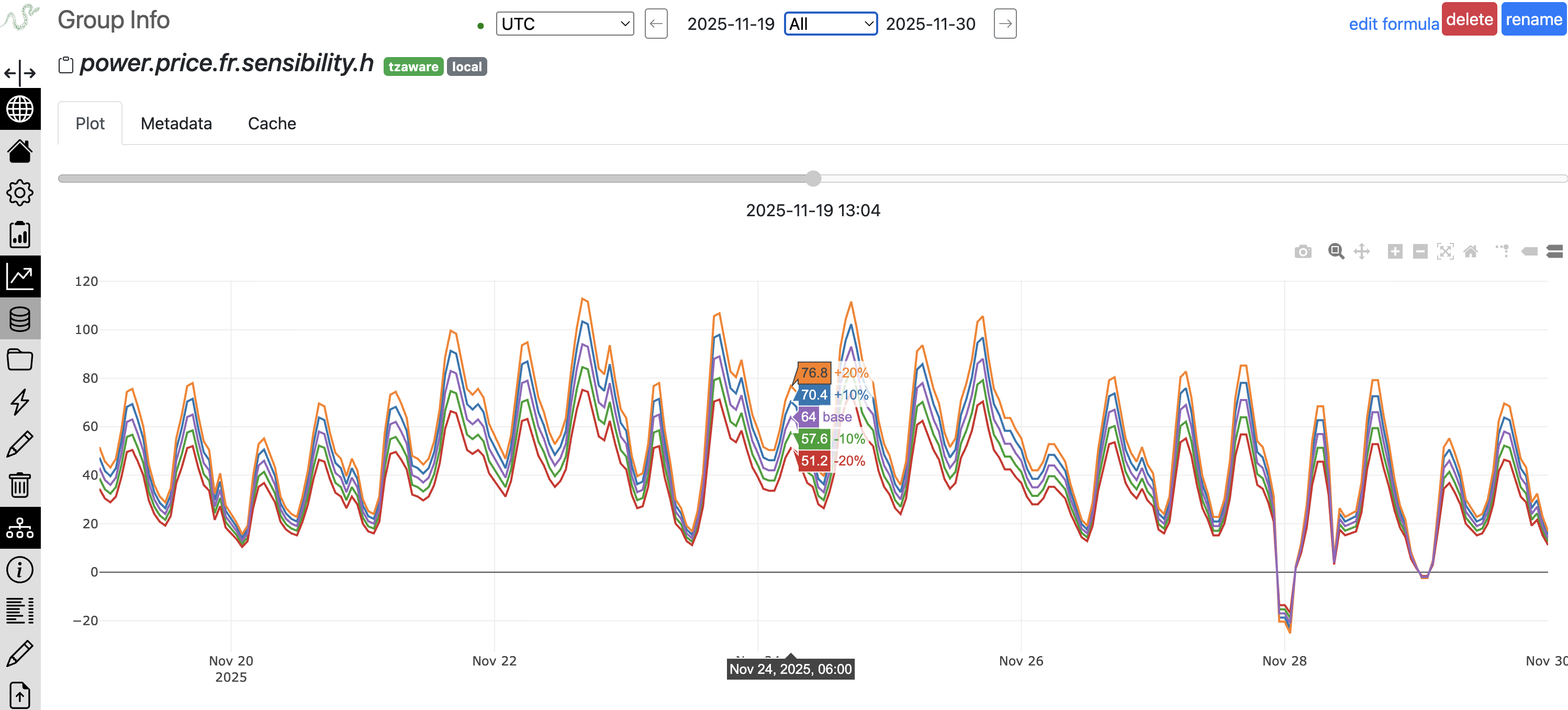
They come in two flavors: primary groups (stored) and formula groups.
Here’s how creating a primary group looks like:
import pandas as pd
from tshistory.api import timeseries

tsa = timeseries()

group_data = pd.DataFrame({
    'low': [17.0, 21.6, 18.2],
    'mid': [20.5, 22.1, 23.4],
    'high': [21.3, 22.6, 24.9]
}, index=pd.date_range('2025-01-01', periods=3, freq='M'))

tsa.group_update('subsidiary1.revenues.fcst', group_data, 'operator')
Note
Groups in tshistory have a fixed schema once created: you can’t change the columns nor, like with time series, fundamental attributes such as tz-awareness.
All group_update and group_replace operations must match the
exact column structure of the original group.
This constraint ensures:
Data Integrity: Prevents accidental schema changes that could break downstream consumers
Version Consistency: All historical versions of a group maintain the same structure
Group Formulas#
Group formulas enable powerful computed groups using the formula language. Like series formulas, they are evaluated on-demand and inherit versioning from their components.
Group Formula Operators#
The formula language provides specialized operators for working with groups:
group
Retrieves a group from storage or formula, similar to the series
operator:
(group "subsidiary1.revenues.fcst")
group-add
Performs element-wise addition of multiple groups. All groups must have compatible indexes:
;; obtain low, mid and high revenue scenarios for a company with 3 subsidiaries
(group-add (group "subsidiary1.revenues.fcst")
           (group "subsidiary2.revenues.fcst")
           (group "subsidiary3.revenues.fcst"))
This operator aligns the groups by their time index and adds corresponding columns.
group-add-series
Adds a series to every column of a group. Useful for adjustments or calibrations:
;; convert temperatures from kelvin to celsius
(group-add-series (group "temperatures_kelvin")
                  (series "kelvin_to_celsius_offset"))
The series is broadcast to all scenarios in the group.
label and group-from-series
Constructs a new group by binding multiple series together as named scenarios:
;; create scenarios from individual series
(group-from-series
    (label "high" (series "forecast_high"))
    (label "mid" (series "forecast_mid"))
    (label "low" (series "forecast_low")))
Each label creates a named column in the resulting group. This is
particularly useful for creating scenario-based groups from individual
forecast series.
seasonal
Turns a single series into a group of day-of-year profiles — one column per year — for folded, year-over-year plots:
;; five years of daily demand, one column per year
(seasonal (series "power.demand.d") 5)
The depth argument sets how many past years to include (omit it to use
every available year). It is the group counterpart of the doy-agg series
operator, which instead collapses those years into a single profile.
subst and substitute-in-series-formula
Turns an existing series formula into a group, by substituting groups
for some of the series it references. The last subst argument names
a family: substitutions of the same family advance together on their
scenarios (the groups must share their scenario names), while distinct
families combine as a cartesian product.
With a single family, each scenario of the result is the formula evaluated on the matching scenarios of the groups:
(substitute-in-series-formula "energy-balance"
    (subst "production" "production-scenarios" "energy")
    (subst "consumption" "consumption-scenarios" "energy"))
If energy-balance is defined as (add (series "production")
(series "consumption")), the result has one scenario per scenario of
the input groups, each being the sum of the corresponding columns.
With two families, all the combinations are produced:
(substitute-in-series-formula "energy-cost"
    (subst "demand" "demand-scenarios" "weather")
    (subst "price" "price-scenarios" "market"))
If energy-cost is (mul (series "demand") (series "price")),
demand-scenarios carries N weather scenarios and
price-scenarios M market scenarios, the result has N×M scenarios —
one per (weather, market) pair.
Creating and Using Group Formulas#
Register a group formula using the API:
>>> tsa.register_group_formula(
...     'eu_production_mwh',
...     '(group-add (group "france_production_mwh") '
...     '           (group "germany_production_mwh") '
...     '           (group "spain_production_mwh"))'
... )
Once registered, use it like any other group:
>>> df = tsa.group_get('eu_production_mwh')
>>> print(df.head())
                      low    mid    high
2025-01-01 00:00:00  48.5   52.2   55.8
2025-01-02 00:00:00  49.1   52.7   56.4
Group Formula Metadata#
Group formulas can have metadata like primary groups:
>>> tsa.update_group_metadata('eu_production_mwh', {
...     'unit': 'mwh',
...     'frequency': 'daily',
...     'scenarios': 'energy production forecasts'
... })
Formula-Specific Methods#
Several methods are specific to group formulas:
>>> # get the formula definition
>>> formula = tsa.group_formula('eu_production_mwh')
>>> print(formula)
'(group-add (group "france_production_mwh") ...)'

>>> # get expanded formula (resolving nested formulas)
>>> expanded = tsa.group_formula('eu_production_mwh', expanded=True)

>>> # test a formula without registering
>>> result = tsa.group_eval_formula(
...     '(group-add (group "test1") (group "test2"))'
... )
Formula Bindings: Creating Groups from Series Formulas#
The bindings system is a powerful mechanism that transforms series formulas into group formulas by replacing selected series references with groups. This allows you to apply the same calculation logic across multiple scenarios simultaneously.
Core Concept
Given a series formula that combines multiple series, you can “bind” some of those series to groups. The formula then evaluates column-wise across the bound groups, producing a group as output.
The Family Concept
A “family” groups together series/groups that play equivalent roles in the formula. Key rules:
All groups within a family must have the same number of columns (scenarios)
The formula is evaluated column-by-column across families
Column 1 of each group in a family is used together, then column 2, etc.
Example: Weather Scenario Modeling
Consider a formula that combines temperature and wind data with adjustments:
# original series formula
tsa.register_formula(
    'weather_index',
    '(add (mul (series "temp_base") 0.7) '
    '     (mul (series "wind_base") 0.3) '
    '     (series "seasonal_adjustment"))'
)
Now create groups for different weather scenarios:
# temperature scenarios (3 scenarios: cold, normal, warm)
temp_scenarios = pd.DataFrame({
    'cold': [5, 6, 7],
    'normal': [15, 16, 17],
    'warm': [25, 26, 27]
}, index=dates)
tsa.group_replace('temp_scenarios', temp_scenarios, 'operator')

# wind scenarios (must also have 3 scenarios to match)
wind_scenarios = pd.DataFrame({
    'calm': [5, 5, 5],
    'moderate': [15, 15, 15],
    'strong': [30, 30, 30]
}, index=dates)
tsa.group_replace('wind_scenarios', wind_scenarios, 'operator')
Bind the formula to create a group:
# define the binding
binding = pd.DataFrame([
    ['temp_base', 'temp_scenarios', 'weather'],
    ['wind_base', 'wind_scenarios', 'weather'],
    # seasonal_adjustment remains a regular series
], columns=['series', 'group', 'family'])

# register the bound group
tsa.register_formula_bindings(
    'weather_index_scenarios',  # new group name
    'weather_index',            # source formula
    binding
)
Result:
>>> result = tsa.group_get('weather_index_scenarios')
>>> print(result.columns)
['scenario_1', 'scenario_2', 'scenario_3']

# each column computed as:
# scenario_1: temp_scenarios['cold'] * 0.7 + wind_scenarios['calm'] * 0.3 + seasonal_adjustment
# scenario_2: temp_scenarios['normal'] * 0.7 + wind_scenarios['moderate'] * 0.3 + seasonal_adjustment
# scenario_3: temp_scenarios['warm'] * 0.7 + wind_scenarios['strong'] * 0.3 + seasonal_adjustment
Multiple Families Example
Families are useful when you want different binding strategies for different parts of the formula:
# formula with different types of inputs
tsa.register_formula(
    'complex_calc',
    '(add (series "regional_data") '
    '     (mul (series "global_factor") (series "local_factor")))'
)

# binding with two families
binding = pd.DataFrame([
    ['regional_data', 'regions_group', 'regions'],      # 5 regions
    ['local_factor', 'local_scenarios', 'scenarios'],   # 3 scenarios
    # global_factor remains unbound (same for all combinations)
], columns=['series', 'group', 'family'])
This would create a group with 15 columns (5 regions × 3 scenarios), exploring all combinations.
Key Points
Unbound series in the formula remain as series (broadcast to all columns)
All groups in the same family must have identical column counts
The binding creates a “bound” type group that dynamically evaluates the formula
Use
bindings_for(name)to retrieve the binding configuration for a group
Common Use Cases#
Groups are ideal for:
Ensemble Forecasts: Scenarized stochastic weather scenarios
They may (depending on various factors) be interesting with:
Financial Data: OHLC (Open, High, Low, Close) price data
IoT Sensors: Multiple sensor readings from the same device
Economic Indicators: Related economic metrics that should be kept in sync
In many cases, it will be more convenient to handle data acquisition as individual time series, and then create a group from them (using the group-from-series formulaic operator).
Group API Reference#
Primary Group Operations#
- class mainsource(*args, **kwargs)
API façade for the main source (talks directly to the storage)
The api documentation is carried by this object. The http client provides exactly the same methods.
- group_exists(name)
Checks the existence of a group with a given name.
- Parameters:
name (str)
- Return type:
bool
- group_type(name)
Return the type of a group, for instance ‘primary’, ‘formula’ or ‘bound’
- Parameters:
name (str)
- Return type:
str
- group_find(query=None, limit=None, meta=False, sources=[], _source='local')
Return a list of group descriptors matching the query.
A series descriptor is a string-like object (exhibiting the series name) with additional attributes. If meta has been set to True, the .meta (for normal metadata) and .imeta (for internal metadata) fields will be populated (non None). Lastly, the .source and .kind attributes provides the series source and kind.
Here is an example:
tsa.group_find(
   '(by.and '
   '  (by.tzaware)'
   '  (by.name "power capacity") '
   '  (by.metakey "plant")'
   '  (by.not (by.or '
   '    (by.metaitem "plant_type" "oil")'
   '    (by.metaitem "plant_type" "coal")))'
   '  (by.metaitem "unit" "mwh")'
   '  (by.metaitem "country" "fr"))'
)
The following filters can be used from the search module:
by.tzaware: no parameter, yields time zone aware series names
by.name <str>: takes a space separated string of word, yields series names containing the substrings (in order)
by.metakey <str>: takes a string, strictly matches all series having this metadata key
by.metaitems <str> <str-or-number>: takes a string (key) and an str (or numerical) value and yields all series strictly matching this metadata item
by.and: takes a variable number of filters as above to combine them
by.or: takes a variable number of filters as above to combine them
by.not: produce the negation of a filter
Also inequalities on metadata values can be used:
<, <=, >, >=, =: take a string key, a value (str or num)
As in (<= “max_capacity” 900)
- Parameters:
query (str | None)
limit (int | None)
meta (int | None)
sources (List[str])
_source (str | None)
- Return type:
List[ts]
- group_rename(name, newname, propagate=True, **_kw)
Rename a group.
The target name must be available.
- Parameters:
name (str)
newname (str)
propagate (bool)
- Return type:
None
- group_source(name)
Provide the source name of a group.
When coming from the main source, it returns ‘local’.
- Parameters:
name (str)
- Return type:
str | None
- group_get(name, revision_date=None, from_value_date=None, to_value_date=None)
Get a group by name.
By default one gets the latest version.
By specifying revision_date one can get the closest version matching the given date.
The from_value_date and to_value_date parameters permit to specify a narrower date range (by default all points are provided).
If the group does not exists, a None is returned.
- Parameters:
name (str)
revision_date (Timestamp | None)
from_value_date (Timestamp | None)
- Return type:
DataFrame | None
- group_interval(name)
Return the value date range of a group.
- Parameters:
name (str)
- Return type:
Interval
- group_inferred_freq(name, revision_date=None, from_value_date=None, to_value_date=None)
Return the inferred frequency of a group.
- Parameters:
name (str)
revision_date (Timestamp | None)
from_value_date (Timestamp | None)
to_value_date (Timestamp | None)
- Return type:
Tuple[Timedelta, float] | None
- group_insertion_dates(name, from_insertion_date=None, to_insertion_date=None)
Get the list of all insertion dates for any given group
- Parameters:
name (str)
from_insertion_date (Timestamp | None)
to_insertion_date (Timestamp | None)
- Return type:
List[Timestamp]
- group_history(name, from_value_date=None, to_value_date=None, from_insertion_date=None, to_insertion_date=None)
Get all versions of a group in the form of a dict from insertion dates to dataframe.
It is possible to restrict the versions range by specifying from_insertion_date and to_insertion_date.
It is possible to restrict the values range by specifying from_value_date and to_value_date.
- Parameters:
name (str)
from_value_date (Timestamp | None)
to_value_date (Timestamp | None)
from_insertion_date (Timestamp | None)
to_insertion_date (Timestamp | None)
- Return type:
Dict[Timestamp, DataFrame]
- group_replace(name, df, author, metadata=None, insertion_date=None)
Replace a group named by <name> with the input dataframe.
This creates a new version of the group. The group is completely replaced with the provided values.
The author is mandatory. The metadata dictionary allows to associate any metadata with the new group revision.
It is possible to force an insertion_date, which can only be higher than the previous insertion_date.
- Parameters:
name (str)
df (DataFrame)
author (str)
metadata (dict | None)
insertion_date (Timestamp | None)
- Return type:
None
- group_delete(name, force=False)
Override to add dependency checking.
Delete a group.
By default, refuses to delete if the group is referenced by group formulas. Use force=True to override this safety check.
- Parameters:
name (str)
force (bool)
- Return type:
None
- group_internal_metadata(name)
Return a group internal metadata dictionary.
- Parameters:
name (str)
- Return type:
Dict[str, Any] | None
- group_metadata(name)
Return a group metadata dictionary.
- Parameters:
name (str)
- Return type:
Dict[str, Any] | None
- group_old_metadata(name)
Get a list of the the older versions of the metadata.
- Parameters:
name (str)
- Return type:
List[Tuple[Timestamp, dict, str]]
- update_group_metadata(name, meta, user='no-user')
Update a group metadata with a dictionary from strings to anything json-serializable.
- Parameters:
name (str)
meta (Dict[str, Any])
user (str)
- Return type:
None
- replace_group_metadata(name, meta, user='no-user')
Replace a group metadata with a dictionary from strings to anything json-serializable.
- Parameters:
name (str)
meta (Dict[str, Any])
user (str)
- Return type:
None
- group_catalog(allsources=True)
Produces a catalog of all groups in the form of a mapping from source to a list of (name, kind) pair.
- Parameters:
allsources (bool)
- Return type:
Dict[Tuple[str, str], List[Tuple[str, str]]]
Formula Group Operations#
- class mainsource(*args, **kwargs)
API façade for the main source (talks directly to the storage)
The api documentation is carried by this object. The http client provides exactly the same methods.
- register_group_formula(name, formula)
Define a group as a named formula.
You can use any operator (including those working on series) provided the top-level expression is a group.
- Parameters:
name (str)
formula (str)
- Return type:
None
- group_formula(name, display=True, expanded=False, remote=True, level=-1)
Get the group formula associated with a name.
- Parameters:
name (str)
display (bool)
expanded (bool)
remote (bool)
level (int)
- Return type:
str | None
- group_eval_formula(formula, revision_date=None, from_value_date=None, to_value_date=None, tz=None)
Execute a group formula on the spot.
tsa.group_eval_formula('(group-add (group "group1") (group "group2"))')
- Parameters:
formula (str)
revision_date (Timestamp | None)
from_value_date (Timestamp | None)
to_value_date (Timestamp | None)
- Return type:
Series
- register_formula_bindings(groupname, formulaname, bindings)
Define a group by association of an existing series formula and a bindings object.
The designated series formula will be then interpreted as a group formula.
And the bindings object provides mappings that tell which components of the formula are to be interpreted as groups.
Given a formula named “form1”:
(add (series "foo") (series "bar") (series "quux"))
… where one wants to treat “foo” and “bar” as groups. The binding is expressed as a dataframe:
binding = pd.DataFrame(
    [
        ['foo', 'foo-group', 'group'],
        ['bar', 'bar-group', 'group'],
    ],
    columns=('series', 'group', 'family')
)
The complete registration looks like:
register_formula_bindings(
    'groupname',
    'form1',
    pd.DataFrame(
        [
            ['foo', 'foo-group', 'group'],
            ['bar', 'bar-group', 'group'],
        ],
        columns=('series', 'group', 'family')
    ))
Within a given family, all groups must have the same number of members (series) and the member roles are considered equivalent (e.g. meteorological scenarios).
- Parameters:
groupname (str)
formulaname (str)
bindings (DataFrame)
- Return type:
None