Search Query Language Reference#
The Refinery search system uses a powerful query language to find time series and groups based on metadata, names, and other properties. This guide provides comprehensive documentation with extensive examples.
Table of Contents#
Quick Start#
Your First Search#
# find all series containing "temperature" in their name
results = tsa.find('(by.name "temperature")')
assert results == ['room_temperature', 'outside_temperature', 'water_temperature']

# find series by metadata
results = tsa.find('(by.metaitem "sensor_type" "humidity")', meta=True)
assert results[0].meta == {'sensor_type': 'humidity', 'unit': 'percent', 'location': 'building_a'}

# combine conditions
results = tsa.find('(by.and (by.name "daily") (by.metaitem "region" "europe"))', limit=50)
assert len(results) <= 50
Note
As the examples above show, results look like strings - which they are ! But they carry .meta and imeta attributes which, when queried with meta=True, get populated.
Note
find() does not filter on timezone-awareness: naive and tzaware
series alike are returned. To restrict a search, use by.tzaware
or its negation:
# find only timezone-naive series
naive_series = tsa.find('(by.not (by.tzaware))')

# combine with other conditions to find naive series
naive_temp = tsa.find('(by.and (by.name "temperature") (by.not (by.tzaware)))')
The formula operator findseries behaves differently: since
series of both kinds cannot be mixed within a formula, it keeps
only the tzaware ones by default (see its #:naive option).
More find API options#
The find method offers additional capabilities for more advanced use
cases. You can retrieve all series using either find() with no
parameters or the explicit (by.everything) operator.
In federated setups with multiple data sources, the sources
parameter lets you filter results by origin. The result objects also
carry useful attributes: .source indicates where the data comes
from (local or remote) and .kind shows whether it’s a primary
(stored) or formula (computed) series.
# get all series - two equivalent ways
allseries = tsa.find()  # no parameters
allseries = tsa.find('(by.everything)')  # explicit

# filter by source in federated setups
localonly = tsa.find('(by.everything)', sources=['local'])
assert all(s.source == 'local' for s in localonly)

remote_series = tsa.find('(by.name "sales")', sources=['remote'])
assert all(s.source == 'remote' for s in remote_series)

# examine result attributes
results = tsa.find('(by.name "temperature")')
assert results[0].source in ('local', 'remote')
assert results[0].kind in ('primary', 'formula')
Finding Groups#
The same search capabilities are available for groups through the
group_find method. It supports all the same operators and
parameters as find, but searches within the groups namespace
instead of series.
# find groups by name
groups = tsa.group_find('(by.name "weather")')
assert groups == ['weather_station_paris', 'weather_forecast_lyon']
Note
To create actual groups (DataFrames) from series search results, you have two approaches:
# approach 1: using group-from-series formula operator
tsa.register_group_formula(
    'sensor_group',
    '''(group-from-series
        (label "sensor1" (series "temperature_sensor_1"))
        (label "sensor2" (series "temperature_sensor_2"))
        (label "sensor3" (series "temperature_sensor_3")))'''
)

# approach 2: python code to build dataframe from search results
results = tsa.find('(by.metaitem "type" "sensor")')
df = pd.DataFrame({
    name: tsa.get(name)
    for name in results
})
Saving Searches with Baskets#
Baskets allow you to save frequently used search queries for reuse. This is particularly useful for complex queries or when the same set of series needs to be referenced multiple times. Baskets work for both series and groups independently - they maintain separate namespaces controlled by the group parameter.
# register a basket for series
tsa.register_basket('energy_sensors', '(by.and (by.metaitem "type" "sensor") (by.metaitem "category" "energy"))')

# register a basket for groups
tsa.register_basket('weather_groups', '(by.name "weather")', group=True)

# list all series baskets
series_baskets = tsa.list_baskets()
assert 'energy_sensors' in series_baskets

# execute a basket query (supports same parameters as find)
results = tsa.basket('energy_sensors', limit=10, meta=True)
assert results[0].meta['type'] == 'sensor'

# use the basket in formulas
formula = '(add (findseries (by.basket "energy_sensors")))'
The basket editor#
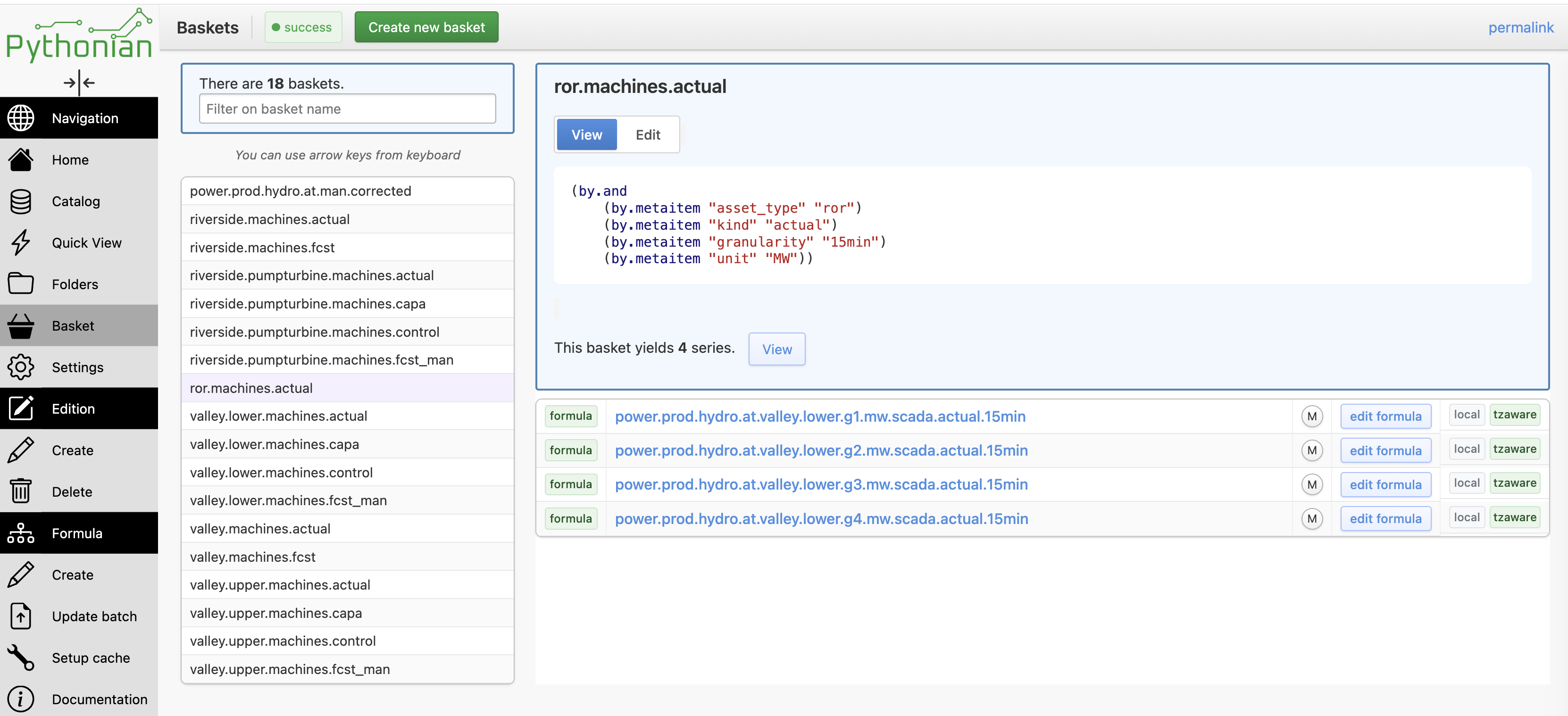
Baskets can also be managed from the browser, on the Baskets page. A panel on the left lists the existing baskets, with a filter on the basket name. Selecting a basket shows it in one of two modes:
View — the series the basket currently yields (This basket yields N series), each row linking to its info page, with an edit formula link for formula series;
Edit — the basket’s query, edited in the same dual editor as the formula editor (a text pane for the lisp expression and a synchronised structured one, see Formulas (computed series)). From there you can Save the changes, Rename the basket, Save a copy under a new name, or Delete it.
Create new basket starts a new, empty one.
Query Syntax#
Structure#
;; Basic structure
(<operator> <argument>)

;; With multiple arguments
(<operator> <arg1> ... <argn>)

;; Optional parameters use the #:keyword notation
(<operator> <argument> #:<keyword> <value>)

;; Nested queries
(by.and (by.name "sales") (by.metaitem "region" "north"))
Basic Syntax Rules#
Parentheses: Every query is wrapped in parentheses
(operator args...)Quotes: All string values use double quotes
"value"Nesting: Queries can be nested for complex logic
Case Sensitivity: - Name searches (
by.name) are case-insensitive - Metadata keys and values (by.metakey,by.metaitem) are case-sensitive - Formula content searches (by.formulacontents) are case-sensitive
Basic Search Operators#
Name-based Search: by.name#
Searches for series whose names contain the given words, in order (case-insensitive). A space-separated string is a sequence of substrings that must all appear, in that order, anything in between:
;; Basic name search
(by.name "temperature")  ;; Matches: "room_temperature", "temperature_sensor"

;; Multiple words: substrings in order
(by.name "power capacity")  ;; Matches: "power.fr.capacity.mw"
Metadata Key Search: by.metakey#
Finds series that have a specific metadata key (regardless of the value):
;; Basic metadata key search
(by.metakey "region")    ;; All series that have a "region" metadata field
Metadata Value Search: by.metavalue#
Finds series that have a specific metadata value (regardless of the key):
;; Basic metadata value search
(by.metavalue "europe")    ;; All series that have a metadata field equal to "europe"
Everything Operator: by.everything#
Returns all series without any filtering:
(by.everything) ;; Returns all series
Timezone-Aware Filter: by.tzaware#
Filters for timezone-aware series:
(by.tzaware) ;; Only timezone-aware series
Metadata Value Search: by.metaitem#
Finds series where a specific metadata key has a specific value. The point of examples here is also to illustrate use of the series matadata:
;; Basic metadata value search
(by.metaitem "region" "europe")          ;; Series in Europe region
(by.metaitem "data_type" "financial")    ;; Financial data

;; Quality and status
(by.metaitem "quality" "high")           ;; High quality data
(by.metaitem "confidence" "reliable")    ;; Reliable data
Internal Metadata Search: by.internal-metaitem#
Searches internal metadata (system-managed metadata):
(by.internal-metaitem "supervision_status" "supervised")  ;; Find supervised series

;; Separate string series from numeric ones: the internal
;; value_type key holds the storage dtype
(by.internal-metaitem "value_type" "object")   ;; String series only
(by.internal-metaitem "value_type" "float64")  ;; Numeric series only
Internal Metadata Key Search: by.internal-metakey#
Finds series that have a specific internal metadata key, regardless of
the value — the internal counterpart of by.metakey:
;; Series stored on the fs1 backend (only those carry a path key)
(by.internal-metakey "path")

;; Its negation: series stored in postgres
(by.not (by.internal-metakey "path"))
Basket Search: by.basket#
Expands to the query saved in a basket (see Saving Searches with Baskets), composable with any other predicate:
(by.basket "energy_sensors")

;; Restrict a basket further
(by.and (by.basket "energy_sensors") (by.name "daily"))
Supervision status shortcuts#
Two convenience operators match on the supervision status directly (equivalent
to the by.internal-metaitem form above):
(by.supervised)     ;; series with both provider updates and manual corrections
(by.handcrafted)    ;; series maintained entirely by hand
Value Comparison Search#
Finds series where a metadata value meets a numerical condition.
Warning
It must be noted that while these filters can be used by .find
and in baskets, they are also available in the formula language, as
input parameters of the findseries operator. In the later case,
the notation can be different. This is the case for values
filtering.
In any case, the Web interface provides structured editors that can help you discover the available operators in the relevant context (find / basket / findseries) and will guide you write correct filters.
;; Direct comparison operators (for use with find)
(< "temperature" 25)          ;; Temperature metadata < 25
(<= "confidence" 0.8)         ;; Confidence <= 80%
(> "threshold" 100)           ;; Threshold > 100
(>= "count" 10)              ;; Count >= 10
(= "status" "active")        ;; Status equals "active"
Logical Operators#
AND Operator: by.and#
Combines multiple conditions where ALL must be true:
(by.and (by.name "temperature") (by.metaitem "region" "europe"))
OR Operator: by.or#
Combines multiple conditions where ANY can be true:
(by.or (by.metaitem "region" "europe") (by.metaitem "region" "asia"))

;; Multiple regions
(by.or (by.metaitem "country" "france")
        (by.metaitem "country" "germany")
        (by.metaitem "country" "italy"))
NOT Operator: by.not#
Excludes series matching the specified condition:
(by.not (by.metaitem "status" "deprecated")) ;; Exclude deprecated series
(by.not (by.name "test"))                    ;; Exclude test series
Formula-Specific Operators#
Formula Detection: by.formula#
Finds all computed (formula) series:
;; Find all formula series
(by.formula)

;; Combine with other conditions
(by.and (by.formula) (by.metaitem "department" "finance"))    ;; Finance formulas
(by.and (by.formula) (by.metaitem "type" "kpi"))              ;; KPI formulas

;; Find non-formula (stored) series
(by.not (by.formula))
Formula Content Search: by.formulacontents#
Note
This is in practice quite useful to find a specific formula when we don’t know its name (or other properties) but we have an idea of what it does.
Searches within the actual formula expressions:
;; Find formulas using specific functions
(by.formulacontents "resample")          ;; Formulas with resampling
(by.formulacontents "priority")          ;; Formulas using priority operator

;; Find formulas referencing specific series
(by.formulacontents "stock_price")       ;; Formulas using directly stock_price series

;; Advanced operations
(by.formulacontents "findseries")        ;; Dynamic series discovery formulas
(by.formulacontents "constant")          ;; Formulas creating constants
Tree and Cache Operators#
Tree Path Filters#
Filter series based on their organization in tree paths:
(by.without-path)                    ;; Series not in any tree path
(by.at-path "energy.solar")          ;; Series at this exact path
(by.at-path "energy" #:children #t)  ;; Series at this path and its children
Cache Policy Filters#
Filter by cache policy (refinery-specific):
(by.cache)                    ;; Has any cache policy
(by.cachepolicy "daily_cache") ;; Has specific cache policy