Formulas (computed series)#
Table of Contents#
Introduction#
Formulas are computed time series that derive their values dynamically from other series through calculations. Unlike primary series that store data directly in the database, formulas are evaluated on-demand using a powerful expression language.
Key characteristics:
Read-only: Formulas cannot be updated directly with new data points. Their values are entirely determined by the formula expression and the underlying series data.
Versioned: Formulas automatically inherit version history from their constituent series. When you request a formula at a specific revision date, it computes using the series versions that existed at that time.
Lazy evaluation: Formula values are computed only when requested, not when underlying data changes. This ensures efficient resource usage.
Composable: Formulas can reference other formulas, allowing you to build complex calculations from simpler building blocks.
Cacheable: For performance-critical scenarios, formula results can be materialized into a cache that refreshes periodically.
API transparency: Formula and stored series are indistinguishable through the read API (
get,history,metadata, etc.). You access them identically - the system handles whether to fetch stored data or compute formula values. Only specific methods liketype()orformula()reveal whether a series is stored or computed.
Creating Your First Formula#
Let’s start with a simple example that adds two series together. Note that the series referenced in the formula must already exist in the database:
>>> from tshistory.api import timeseries
>>> tsa = timeseries()

>>> # register a formula that computes total energy
>>> # both solar_production and wind_production must exist
>>> tsa.register_formula(
...     'total_energy',
...     '(add (series "solar_production") (series "wind_production"))'
... )

>>> # use it exactly like a stored series
>>> total = tsa.get('total_energy')
>>> print(total)
2024-01-01    150.5
2024-01-02    142.3
2024-01-03    163.7
Name: total_energy, dtype: float64
The formula is now permanently registered and will automatically compute whenever requested.
Formula Language Basics#
Formulas use a Lisp-like syntax with these key elements:
;; operator and arguments in parentheses
(add (series "a") (series "b"))

;; multiply by constant 1.2
(* 1.2 (series "price"))

;; reference a series
(series "temperature_celsius")

;; forward fill missing values using optional parameter
(series "noisy_data" #:fill "ffill")

;; daily average from hourly data
(resample (series "hourly") "D" #:method "mean")

;; nested operations compute (revenue + other_income) / costs
(div (add (series "revenue") (series "other_income"))
     (series "costs"))
For the complete list of available operators, see Formula Language Reference.
Updating a Formula#
To modify an existing formula, use register_formula again with the
same name:
>>> # original formula
>>> tsa.register_formula(
...     'total_energy',
...     '(add (series "solar") (series "wind"))'
... )

>>> # update to include hydro
>>> tsa.register_formula(
...     'total_energy',
...     '(add (series "solar") (series "wind") (series "hydro"))'
... )

>>> # the formula now includes three components
>>> print(tsa.formula('total_energy'))
(add (series "solar") (series "wind") (series "hydro"))
Deleting a Formula#
Remove a formula when it’s no longer needed:
>>> tsa.delete('total_energy')
>>> tsa.exists('total_energy')
False
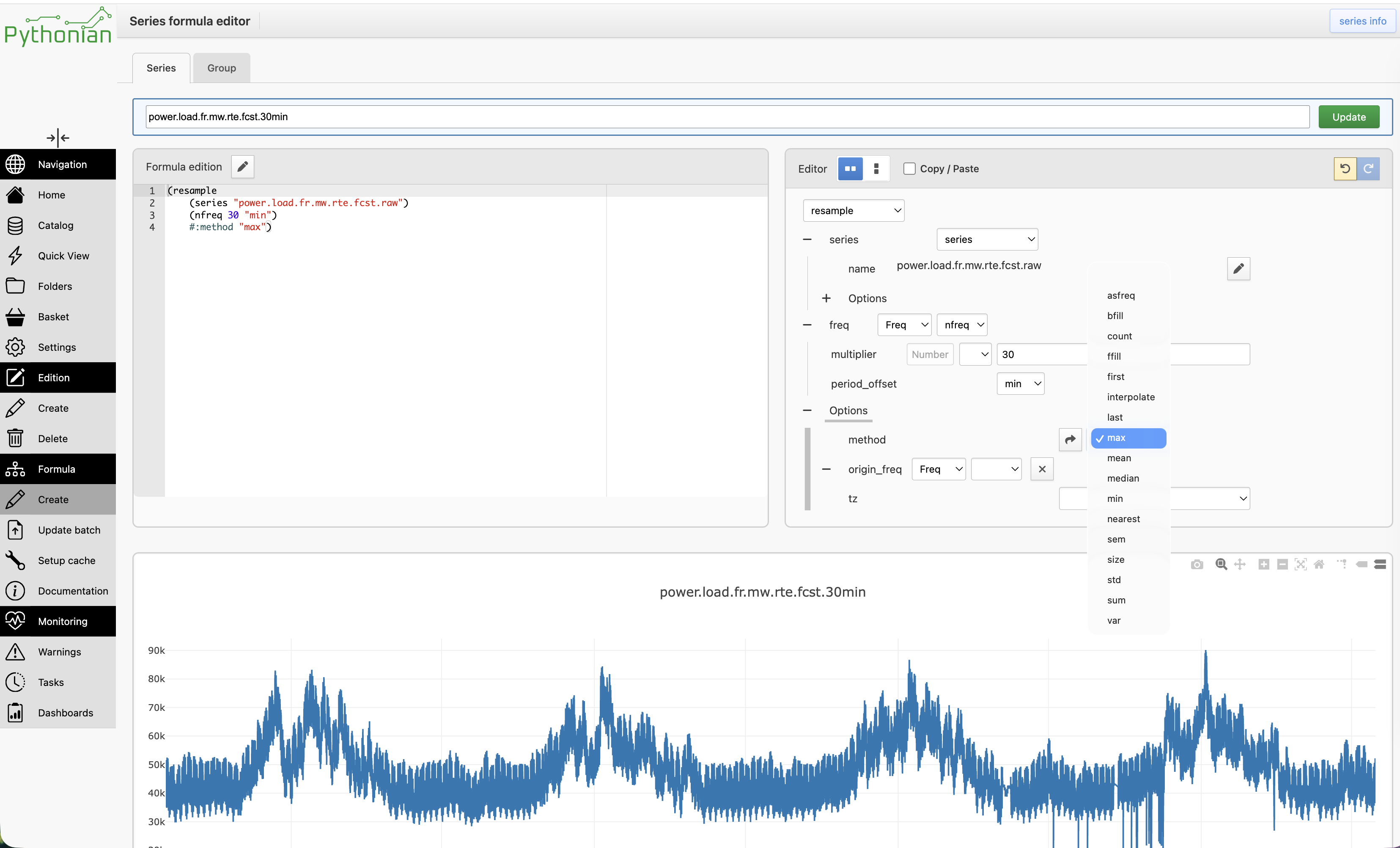
The formula editor#
Formulas can also be written and edited from the browser, with the formula editor — reached from the Formula menu (to create one) or from the edit formula links found across the interface (the catalog, baskets, …) and a series’ info page. It has a Series and a Group tab, depending on what the formula produces.
You give the formula a name and edit its definition in two synchronised panes:
Formula edition — a text editor for the lisp expression, with syntax highlighting;
Editor — a structured, form-based view of the same expression, with a drop-down per operator and a field per argument, handy for discovering the available operators and their parameters.
A live plot below previews the result as you edit, and a series info link opens the series’ info page. Create saves a new formula and Update saves changes to an existing one; undo/redo and a copy/paste mode are also available.
Using Formula Series#
Formula series have some specific behaviors and methods that distinguish them from primary series.
Formula-Specific API Methods#
>>> # get the formula expression
>>> expr = tsa.formula('total_energy')
>>> print(expr)
'(add (series "solar") (series "wind") (series "hydro"))'

>>> # check if a series is a formula
>>> tsa.type('total_energy')
'formula'
When formulas reference other formulas, you can see the expanded
expression. For example, if ‘renewable’ is defined as (add (series
"solar") (series "wind")) and ‘total’ is defined as (add (series
"renewable") (series "hydro")):
>>> tsa.formula('total')
'(add (series "renewable") (series "hydro"))'

>>> tsa.formula('total', expanded=True)
'(add (add (series "solar") (series "wind")) (series "hydro"))'
Formula Dependencies#
Understanding what a formula depends on is crucial for debugging and maintenance:
>>> # direct dependencies of a formula
>>> tsa.formula_components('total_energy')
{'total_energy': ['solar', 'wind', 'hydro']}
For nested formulas where ‘total’ uses ‘renewable’ which in turn uses ‘solar’ and ‘wind’, the expanded view shows the full dependency tree:
>>> tsa.formula_components('total', expanded=True)
{'total': [{'renewable': ['solar', 'wind']}, 'hydro']}
Formula Insertion Dates#
Formulas have a unique behavior regarding insertion dates. They inherit the union of all insertion dates from their components. If solar was updated on January 1 and 3, and wind was updated on January 2 and 3, the formula shows all three dates:
>>> tsa.insertion_dates('total_energy')
[Timestamp('2024-01-01 09:00:00+0000', tz='UTC'),
 Timestamp('2024-01-02 09:00:00+0000', tz='UTC'),
 Timestamp('2024-01-03 09:00:00+0000', tz='UTC')]
This means the formula’s history contains a version for every change in any component series.
Formula Evaluation Context#
Formulas can use special operators that access evaluation context. The
today() operator is particularly useful for creating rolling
windows:
>>> # formula using today() operator
>>> tsa.register_formula(
...     'last_30_days_avg',
...     '(rolling (slice (series "temperature") '
...     '         #:fromdate (shifted (today) #:days -30)) 7)'
... )
When called normally, today() returns the current date:
>>> current = tsa.get('last_30_days_avg')
When called with a revision_date, today() becomes that date,
allowing the formula to compute as if evaluated in the past:
>>> historical = tsa.get('last_30_days_avg',
...                      revision_date='2023-06-01T00:00:00Z')
In this case, the formula computes as if “today” was June 1, 2023, creating a 30-day window ending on that date.
Additional Formula Methods#
Testing formulas without registering them is useful during development:
>>> result = tsa.eval_formula('(add (series "a") (series "b"))')
This evaluates the expression and returns the computed series without saving the formula.
Check the depth of a formula:
>>> tsa.formula_depth('complex_formula')
20
View historical formula definitions when a formula has been modified over time:
>>> history = tsa.oldformulas('total_energy')
>>> for formula, timestamp, author in history:
...     print(f"{timestamp} by {author}: {formula}")
2024-01-01 10:00:00+00:00 by alice: (add (series "solar") (series "wind"))
2024-02-15 14:30:00+00:00 by bob: (add (series "solar") (series "wind") (series "hydro"))
Renaming Series and Formula Propagation#
When renaming a series that is referenced in formulas, the system can automatically update all formulas to use the new name:
>>> # rename with propagation (default)
>>> tsa.rename('solar', 'solar_pv')
This automatically rewrites all formulas that reference ‘solar’ to use ‘solar_pv’ instead. The system prevents renaming if the new name would conflict with existing references in formulas.
>>> # rename without propagation
>>> tsa.rename('solar', 'solar_pv', propagate=False)
Without propagation, formulas referencing the old name will break. Use this only when you intend to update formulas manually or delete them.
Deleting Series Referenced in Formulas#
The system refuses to delete a series that is still referenced by formulas or group formulas — the error names the referencing items:
>>> tsa.delete('solar')
ValueError: cannot delete `solar`: referenced by series total_energy
The check can be overridden with force=True; the referencing
formulas are then left in place and will fail at evaluation time:
>>> tsa.delete('solar', force=True)
>>> tsa.get('total_energy')
ValueError: No such series `solar`
To enumerate what depends on a series before deleting it, use
tsa.depends('solar', reverse=True).
Performance and Caching#
Complex formulas with deep nesting or expensive computations may benefit from caching. The cache system materializes formula results and refreshes them periodically, improving query performance.
Cache Impact on Read Operations#
When a formula has an active cache, the system intelligently decides whether to use cached or live data.
get() method behavior with cache:
The system automatically detects if the cache is stale by analyzing the regularity of cache insertion dates. If more than 2 expected update intervals have passed since the last cache update, it considers the cache stale.
For stale cache, the system:
Retrieves the cached historical data
Computes fresh data for a window defined by the cache policy’s
look_beforeandlook_afterparametersPatches the cached data with the fresh computation (fresh data overwrites cached for overlapping periods)
Returns only the date range you requested
This ensures you get cached performance for historical data while
still receiving fresh data for recent periods. Use nocache=True to
bypass the cache entirely and force live computation.
insertion_dates() method behavior with cache:
Returns the cache’s insertion dates, but transparently completes the
list with uncached formula insertion dates for any periods before the
cache was initialized. This provides a complete view of the formula’s
version history regardless of cache coverage. Use nocache=True to
get the formula’s actual insertion dates without any cache influence.
The cache system is designed to be transparent - it automatically provides the best available data based on freshness and coverage.
See Formulas: when to use a cache/materialized view for detailed guidance on cache configuration.
Advanced: Creating Custom Operators#
This is a fundamental need. Operators are fixed python functions exposed through a lispy syntax. Applications need a variety of fancy operators.
Declaring a new operator#
One just needs to decorate a python function with the func
decorator:
from tshistory_formula.registry import func

@func('identity')
def passthrough(series: pd.Series) -> pd.Series:
   """
   Return the timeseries.

   Example: `(identity (series "my_series"))`

   """
    return series
The operator will be known to the outer world by the name given to
@func, not the python function name (which can be arbitrary).
You must provide correct type annotations : the formula language is statically typed and the typechecker will refuse to work with an untyped operator.
Note
The function’s docstring is mandatory. It will appear in the formula operators documentation.
For the tool to assimilate this custom operator, a new section has to be added to the pyproject.toml configuration. Configuration example below:
[project]
name = "custom"
version = "0.1.0"
authors = [
    {name = "me", email = "me@company.fr"}
]
description = "Custom refinery applicative part"
dependencies = [
    "tshistory_refinery",
]

[project.entry-points.forceimports]
forceimports = "custom.operators:passthrough"
The important part is the [project.entry-points.forceimports]
section: it must point to the module holding your operators (here
custom.operators), followed by the name of one of the functions
defined there (here passthrough) — this is just how Python locates
the module to import at startup, so any function name from that
module will do. Importing the module registers every @func-
decorated operator it contains as a side effect, so if the module
defines several operators, they will all be registered, not just the
one named in the entry point.
This is enough to get a working transformation operator. However operators built to construct series rather than just transform pre-existing series are more complicated.
More Transformation Examples#
Here’s another simple operator with parameters:
@func('scale')
def scale(series: pd.Series, factor: float) -> pd.Series:
    """
    Perform a scalar multiplication to each value of the series.

    Example: `(scale (series "my_series") 3.14)`

    """
    return series * factor
Usage in formulas:
(scale (series "temperature_celsius") 1.8)
Autotrophic series operator#
We start with an example, a proxy operator that gets a series from
an existing time series silo (on the fly) to be served as it came from
your local installation.
We would use it like this: (proxy "a-name" #:parameter 42.3)
As we can see it can look like the series operator, though its
signature might be more complicated (this will be entirely dependent
on the way to enumerate series in the silo).
Hence proxy must be understood as an alternative to series
itself. Here is how the initial part would look:
from tshistory_formula.registry import func, finder, metadata, history, insertion_dates

@func('proxy', auto=True)
def proxy(__interpreter__,
          __from_value_date__,
          __to_value_date__,
          __revision_date__,
          name: str,
          parameter=0):
     """
     Yields data from silo database, taking the silo reference as "name" input.

     Example: `(proxy (name "abc_123456") #:parameter 0)`

     """
    # we assume there is some python client available
    # for the tier timeseries silo
    return silo_client.get(
        parameter=parameter,
        fromdate=__from_value_date__,
        todate=__to_value_date__,
        revdate=__revision_date__
    )
This is a possible implementation of the API get protocol.
The dunder methods are a mandatory part of the signature. The other parameters (positional or keyword) are at your convenience and will be exposed to the formula users.
We must also provide a helper for the formula system to detect the presence of this particular kind of operator in a formula (because it is not like other mere transformation operators).
Let’s have it:
@finder('proxy')
def proxy_finder(cn, tsh, tree):
    return {
        tree[1]: tree
    }
Let us explain the parameters:
cn is a reference to the current database connection
tsh is a reference to the internal API implementation object (and you will need the cn object to use it)
tree is a representation of the formula restricted to the proxy operator use
When implementing a proxy-like operator, one generally won’t need the first two items. But here is an example of what the tree would look like:
['proxy, 'a-name', '#:parameter, 77]
Yes, the half-quoted ‘proxy and ‘#:parameters are not typos. These are respectively a:
symbol (similar to a variable name in Python)
keyword (similar to a Python keyword)
In the finder return dictionary, only the key of the dictionary is important: it should be globally unique and will be used to provide an (internal) alias for the provided series name. For instance, in our example, if parameter has an impact on the returned series identity, it should be part of the key. Like this:
@finder('proxy')
def proxy_finder(cn, tsh, tree):
    return {
        f'tree[1]-tree[2]': tree
    }
We also have to map the metadata, insertion_dates and the history API methods.
@metadata('proxy')
def proxy_metadata(cn, tsh, tree):
    return {
        f'proxy:{tree[1]}-{tree[2]}': {
            'tzaware': True,
            'source': 'silo-proxy',
            'index_type': 'datetime64[ns, UTC]',
            'value_type': 'float64',
            'index_dtype': '|M8[ns]',
            'value_dtype': '<f8'
        }
    }
@history('proxy')
def proxy_history(__interpreter__,
                  from_value_date=None,
                  to_value_date=None,
                  from_insertion_date=None,
                  to_insertion_date=None):
    # write the implementation there :)


@insertion_dates('proxy')
def proxy_idates(__interpreter__,
                 from_value_date=None,
                 to_value_date=None,
                 from_insertion_date=None,
                 to_insertion_date=None):
    # write the implementation there :)
Formula Language Reference#
For the complete formula language specification and all available operators, see Formula Language Reference.
Formula API Reference#
- class mainsource(*args, **kwargs)
API façade for the main source (talks directly to the storage)
The api documentation is carried by this object. The http client provides exactly the same methods.
- register_formula(name, formula, reject_unknown=True, user='no-user')
Define a series as a named formula.
tsa.register_formula('sales.eu', '(add (series "sales.fr") (series "sales.be"))')
- Parameters:
name (str)
formula (str)
reject_unknown (bool)
user (str)
- Return type:
None
- formula(name, display=True, expanded=False, remote=True, level=-1)
Get the formula associated with a name.
tsa.formula('sales.eu')
...
'(add (series "sales.fr") (series "sales.be"))')
Expanding means replacing all series expressions that are formulas with the formula contents.
It can be all-or-nothing with the expanded parameter or asked for a defined level (stopping the expansion process).
The maximum level can be obtained through the formula_depth api call.
- Parameters:
name (str)
display (bool)
expanded (bool)
remote (bool)
level (int)
- Return type:
str | None
- formula_components(name, expanded=False)
Compute a mapping from series name (defined as formulas) to the names of the component series.
If expanded is true, it will expand the formula before computing the components. Hence only “ground” series (stored or autotrophic formulas) will show up in the leaves.
>>> tsa.formula_components('my-series')
{'my-series': ['component-a', 'component-b']}
>>> tsa.formula_components('my-series-2', expanded=True)
{'my-series-2': [{'sub-component-1': ['component-a', 'component-b']}, 'component-b']}
- Parameters:
name (str)
expanded (bool)
- Return type:
Dict[str, list] | None
- formula_depth(name)
Compute the depth of a formula.
The depth is the maximum number of formula series sub expressions that have to be traversed to get to the bottom.
- Parameters:
name (str)
- eval_formula(formula, revision_date=None, from_value_date=None, to_value_date=None, tz=None, nocache=False)
Execute a formula on the spot.
tsa.eval_formula('(add (series "sales.fr") (series "sales.be"))')
- Parameters:
formula (str)
revision_date (Timestamp | None)
from_value_date (Timestamp | None)
to_value_date (Timestamp | None)
nocache (bool)
- Return type:
Series
- class mainsource(*args, **kwargs)
API façade for the main source (talks directly to the storage)
The api documentation is carried by this object. The http client provides exactly the same methods.
- new_cache_policy(name, initial_revdate, look_before, look_after, revdate_rule, schedule_rule)
Create a cache policy.
- Parameters:
name (str)
initial_revdate (str)
look_before (str)
look_after (str)
revdate_rule (str)
schedule_rule (str)
- Return type:
None
- edit_cache_policy(name, initial_revdate, look_before, look_after, revdate_rule, schedule_rule)
Modify an existing cache policy (by name).
- Parameters:
name (str)
initial_revdate (str)
look_before (str)
look_after (str)
revdate_rule (str)
schedule_rule (str)
- Return type:
None
- delete_cache_policy(name)
Delete a cache policy (by name).
- Parameters:
name (str)
- Return type:
None
- set_cache_policy(policyname, seriesnames)
Associate series with a cache policy.
- Parameters:
policyname (str)
seriesnames (List[str])
- Return type:
None
- unset_cache_policy(seriesnames)
Dis-associate series from a cache policy.
- Parameters:
seriesnames (List[str])
- Return type:
None
- cache_free_series(allsources=True)
List the series that are available for association with a cache policy.
- Parameters:
allsources (bool)
- cache_policies()
Return a list of cache policies names.
- cache_policy_series(policyname)
Return the list of series associated with a cache policy.
- Parameters:
policyname (str)
- has_cache(seriesname)
Predicate to verify is a series formula has a cache.
- Parameters:
seriesname (str)
- delete_cache(seriesname)
Purge the cache of a formula.
- Parameters:
seriesname (str)