Formula cache#
A formula is normally evaluated every time it is read. For a heavy formula — a deep dependency tree, many fine-granularity (sub-quarter-hour) series pulled over the whole history, or costly operators — this can make reads slow (a sluggish tsinfo). The formula cache materialises the result of such a series: its values are pre-computed and stored, so a read serves them directly instead of re-evaluating the formula.
When to use it#
Cache a formula when it is slow to display, typically because of:
a deep dependency tree;
many fine-granularity series read over a long history;
costly operators (
resample,priority,block-staircase, or multi-site aggregates such asfindseries+add).
How it works#
Three things are worth understanding.
Refresh — the cache is filled and kept up to date by a rework task,
refresh_formula_cache, run on each policy’s schedule (schedule_rule); it walks the policy’s series in dependency order and materialises new revision dates incrementally. Its on-demand counterpart,refresh_formula_cache_now, is behind the Refresh button. Creating a policy and mapping series does not populate the cache — a refresh has to run.Freshness — when a cached series is read, if its cache has not been refreshed for more than about twice its usual cadence, it is considered stale and recomputed live over the policy’s window. In normal operation the cache is served directly, giving a fast read.
Intermediate nodes speed up their parents — when the engine evaluates a formula, it stops expanding the dependency tree as soon as it reaches a cached sub-series and reads the cached values directly. Caching an intermediate node therefore cuts out the computation of everything below it, for every formula that depends on it.
Configuring a policy#
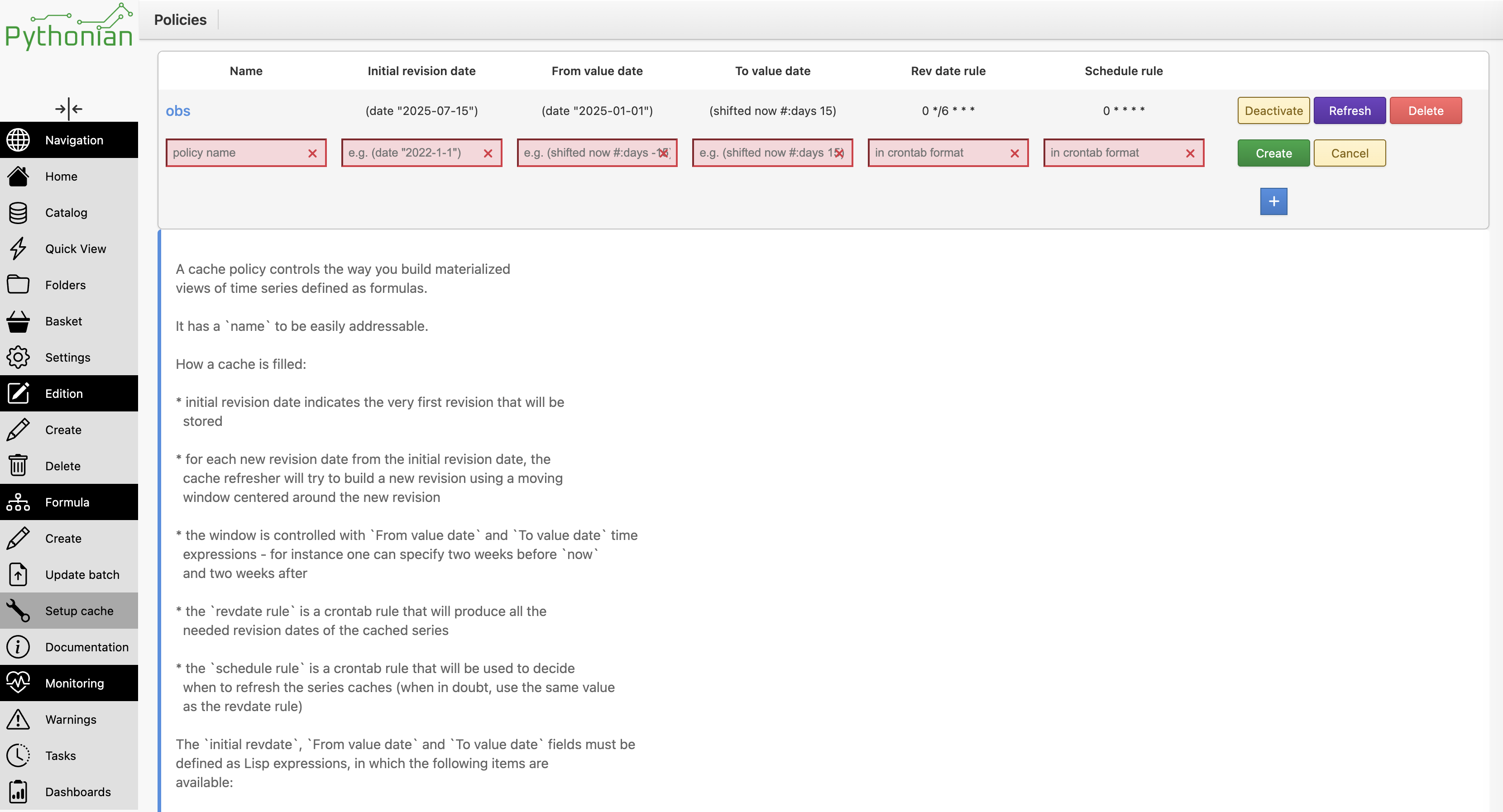
Caching is driven by a policy, which has five parameters:
parameter |
role |
|---|---|
|
revision date of the first snapshot, the only one computed over the full horizon |
|
lower bound of the materialised value window |
|
upper bound of the materialised value window |
|
cron rule: which revision dates to snapshot |
|
cron rule: when the refresh job runs |
A policy works on two time axes (see the Theory part of
To the next level for an illustration).
initial_revdate and revdate_rule live on the revision axis: they say
when snapshots are taken. look_before and look_after live on the value
axis: at each snapshot, only the value dates within
[look_before, look_after] are recomputed. The first snapshot, at
initial_revdate, is the exception: it materialises the whole horizon.
For instance, with initial_revdate on October 1st, one snapshot a day,
look_before = (shifted now #:days -2) and
look_after = (shifted now #:days 3):
                           value dates →
revision dates ↓       …  26 27 28 29 30 01 02 03 04 05 06 07 08

01/10 initial_revdate │ ██ ██ ██ ██ ██ ██ ██ ██ ██ ██
02/10                 │                ██ ██ ██ ██ ██ ██
03/10                 │                   ██ ██ ██ ██ ██ ██
04/10                 │                      ██ ██ ██ ██ ██ ██
05/10                 │                         ██ ██ ██ ██ ██ ██

read on 05/10, from   │ 01 01 01 01 01 02 03 04 05 05 05 05 05 05
Each row is a snapshot, ██ marks the recomputed value dates. The last row
tells, for each value date, which snapshot the value read on October 5th comes
from: everything before September 30th still comes from the initial snapshot.
A snapshot is skipped when no new data arrived upstream since the previous one, so in practice some rows may be missing.
initial_revdate, look_before and look_after are date expressions (a
small lisp), evaluated at refresh time — for example (date "2025-01-01"),
(today), (shifted now #:days -60) or (shifted now #:days 15). The
now variable is bound to the revision date being refreshed and is only
available in look_before / look_after. Do not use it in
initial_revdate: it passes the policy validation but makes the refresh
task fail — use a fixed date or (today)-based expressions there.
The two cron rules serve different purposes: revdate_rule selects which
revision dates to snapshot (e.g. 0 * * * * — every hour on the hour), while
schedule_rule decides when the refresh task actually runs (e.g. 5 * * * *
— five past the hour). The small offset lets data pipelines finish before the
snapshot is taken.
Warning
Values outside the window are frozen. Once a value date has left
[look_before, look_after], the cache never recomputes it: a late
correction of the source (e.g. a consolidated actual published a month
later) never reaches the cache. look_before must reach back as far as
the data can still change. look_after must cover the whole forecast
horizon of the series.
Examples.
# Hourly cache, rebuilt from one week back, six months of value window
initial_revdate  (shifted (today) #:days -7)
look_before      (shifted now #:days -180)
look_after       (shifted now #:days 15)
revdate_rule     0 * * * *      # snapshot every hour
schedule_rule    5 * * * *      # refresh at 5 past the hour

# Once-a-day cache, fixed history start
initial_revdate  (date "2025-01-01")
look_before      (date "2025-01-01")
look_after       (shifted now #:days 15)
revdate_rule     0 6 * * *      # one snapshot a day, 06:00
schedule_rule    15 6 * * *     # refresh at 06:15
Absolute or relative initial_revdate#
initial_revdate is evaluated at each refresh, not only when the cache is
created. Once the cache exists, the refresh starts from the most recent of the
last snapshot and initial_revdate.
In normal operation, it makes no difference: the last snapshot is recent, so it wins.
When the cache is rebuilt (after a formula edit, for instance), a relative date such as
(shifted (today) #:days -30)bounds the work to thirty days of snapshots, while an absolute date replays every snapshot since that date, a cost that grows over time.Nothing is purged: a relative
initial_revdatedoes not delete old snapshots, it only bounds how far back a rebuild goes.After a long interruption (refresh task down for longer than the relative span), the missed snapshots between the last one and
initial_revdateare skipped. Since the following snapshots only cover the value window, the value dates in between may never be materialised. In that case, delete the cache so that it is rebuilt from a full-horizon snapshot.
Cache operations#
From the cache management interface:
Refresh — triggers an immediate refresh (the
refresh_formula_cache_nowtask) over the window. It does not purge anything and does not rebuild an emptied cache.Activate / Deactivate — schedules or removes the periodic
refresh_formula_cachetask. A policy can only be edited while it is deactivated.Delete — purges the cache of all the policy’s series and removes the policy and its series mappings (everything has to be recreated).
Free series — moving a series to the free list purges that series’ cache and unmaps it from the policy.
A series’ cache is emptied in three cases: deleting its policy (every series), moving the series to the free list (that series only), and editing its formula — a change to the formula invalidates its own cache and those of its dependents.
Programmatic access#
A policy can be created and populated from the API:
tsa.new_cache_policy(
    'daily',
    initial_revdate='(shifted (today) #:days -7)',
    look_before='(shifted now #:days -180)',
    look_after='(shifted now #:days 15)',
    revdate_rule='0 * * * *',
    schedule_rule='5 * * * *',
)
tsa.set_cache_policy('daily', ['my.heavy.formula'])
Related methods: cache_policies() and cache_free_series() list the
policies and the formulas still available for caching; cache_series_policy
and has_cache inspect a series; delete_cache clears a series’ cache; and
refresh_series_policy_now triggers an immediate refresh of a policy. See
Formulas (computed series) for the full cache API reference.